
MS Solutions CRM is a fully customizable customer relationship management system that runs entirely within your Microsoft 365 environment — same login, same security, data stays in your cloud. Unlike SaaS CRMs that limit you to renaming fields or adding columns, every element of this CRM — from deal cards and pipeline stages to approval flows and dashboards — can be completely reshaped to match your business. Implementation takes 2–4 weeks. Per-user cost starts at ~€10/month.
When basic CRM is not enough
CRM that works the way your business works
A ready-to-use CRM you can fully reshape to your process. Not add-a-column customizable — rebuild-everything customizable. All within your Microsoft 365.
Trusted by:


Sound familiar?
CRM that doesn't fit
You bought a CRM. It has pipelines, contacts, dashboards. But your sales process doesn't work the way the software assumes. You rename fields, create workarounds, maintain side spreadsheets. The tool that was supposed to bring order — created a parallel process.
Feature comparison paralysis
You've spent weeks comparing CRMs. Every tool has different pricing tiers, feature gates, and fine print. What's included in Pro but not in Starter? Will you need to upgrade in 6 months? You're choosing software, but it feels like solving a puzzle.
Growing costs
Started with 5 users at €50/month each — manageable. Now you have 20 users and the monthly bill is €1,000+ just for CRM. Add premium features, integrations, extra storage — and the cost keeps climbing with every new team member.
Disconnected from everything else
Your CRM lives on one platform. Documents in another. Email in Outlook. Tasks somewhere else. Nothing talks to each other. Your team copies data between systems and nobody trusts which version is current.
CRM stops where your process continues
You closed a deal. Now what? Handover to delivery, project setup, invoicing, ongoing account management — your CRM has no idea any of this exists. The tool covers the first half of your customer relationship and ignores the rest.
01
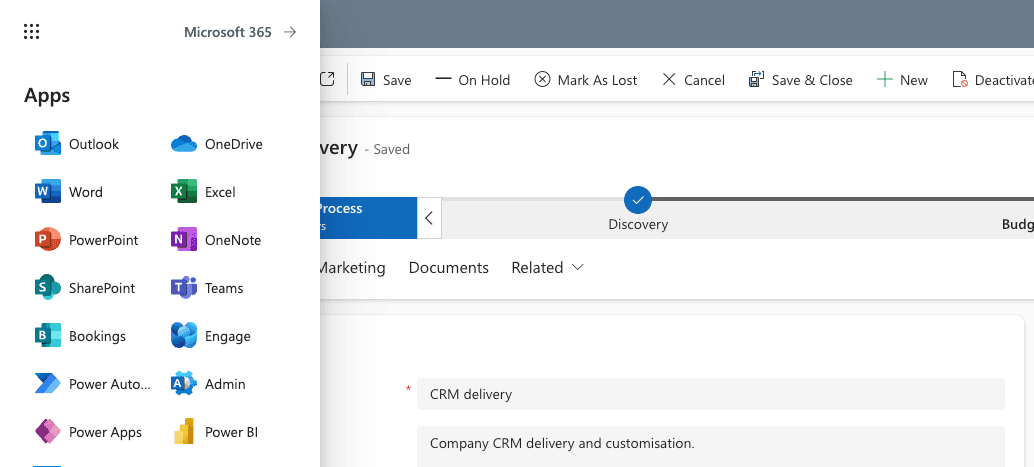
Not a new system. It's your Microsoft 365.
- Same login, same security, same admin panel you already use.
- Data stays in your Microsoft 365 cloud — your environment, your chosen region, your compliance settings.
- Per-user cost: ~€10/month. No hidden CRM platform fees. Compare that to €50–80/month for Pipedrive or HubSpot.
- If you stop working with MS Solutions — everything stays. Your data, your system, your cloud.
02
Not add-a-column customizable. Rebuild-everything customizable.
What "customizable" means in Pipedrive or HubSpot: add a field, rename a column, rearrange a dashboard widget.
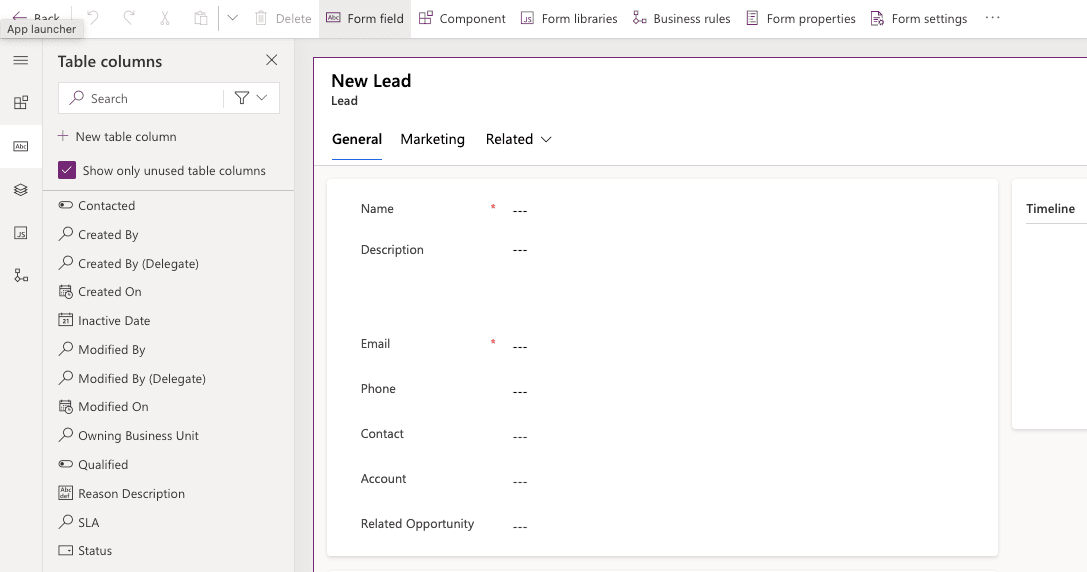
What customizable means here: redesign entire deal cards, build multi-step approval chains, create custom process stages, add new entities, reshape how data flows between teams, build completely custom interfaces. Your process dictates the system — not the other way around.
- Base CRM works out of the box — proven structure you can start with immediately.
- Every form, view, workflow, automation, and business rule is changeable.
- Extend with automations, connect to external systems (accounting, ERP) via API.
- Customize yourself, with MS Solutions, or with any other Microsoft 365 partner. No vendor lock-in.
03
Start with CRM. Grow without limits.
Today you need contact management and a sales pipeline. Tomorrow — delivery tracking, project handover, invoicing approvals, partner management.
With SaaS CRM, that means another tool, another vendor, another monthly bill. With MS Solutions CRM — it's the same app, same license, same data. Your CRM evolves into full process management when you're ready. No migration, no rebuilding, no additional per-user costs.
- Start with what you need now — zero risk of hitting a wall later.
- Add adjacent processes step by step: delivery, projects, approvals, reporting.
- Same user license covers CRM and everything you build next.
What's included
Contacts & Companies
Your complete customer database. Companies, contacts, roles, relationships — all linked. Search, filter, segment instantly.
Leads & Opportunities
Capture leads from any source. Track opportunities through your pipeline stages. See deal values, probabilities, expected close dates.
Pipeline & Stages
Visual pipeline management with configurable stages, gates, and transitions. Define who needs to approve, what data must be filled, when deals move forward.
Email & Outlook
Write and receive emails directly from CRM timelines. Full Outlook integration — sync contacts, track conversations, log interactions automatically.
Tasks & Activities
Create tasks from any record. Assign to team members, set deadlines, track completion. Full activity timeline on every contact, company, and deal.
Documents & Files
Attach proposals, contracts, and files directly to deals and contacts. Version control, shared access — no more searching through folders.
Analytics & Dashboards
Built-in charts for quick insights. Connect Power BI for advanced reporting — pipeline health, conversion rates, team performance, revenue forecasts.
Approvals & Process Flows
Define multi-step approval workflows for deals, discounts, or any decision point. Business process flows guide your team through each stage with required actions and data.
We start from a proven base. Configure to your needs.
Full implementation: 2–4 weeks01
Consultation
We understand your sales process, team structure, and priorities.
02
Setup and configuration
Base CRM deployed to your Microsoft 365 environment within 1 week. Then — configuration and customization to your specific process.
03
Training and handover
Key user training and system handover. Your team is operational.
Why not a standard CRM?
Choosing between CRM solutions usually comes down to three things: how well it fits your process, what it costs per user, and how much you can change it without depending on the vendor. Here's how MS Solutions CRM compares to the most common alternatives.
| MS Solutions CRM | Pipedrive / HubSpot | Dynamics 365 Sales | |
|---|---|---|---|
| Adapts to your process | Fully — deal cards, process flows, business rules, interfaces | Limited — fields, columns, basic automations | Yes, but complex and heavy |
| Per-user cost | ~€10/month | €50–80/month | €60–130/month |
| Your data, your cloud | Microsoft cloud (Dynamics-specific) | ||
| Customize without vendor | Full ownership, no IP restrictions | Limited or impossible | Requires specialized Dynamics consultants |
| Implementation | 2–4 weeks | Days (but rigid) | Months |
| Grow beyond CRM | Same app, same license — expand into full process management | Need separate tools | Possible but expensive (full Dynamics suite) |
| Ownership | Full — stop paying us, everything stays | Vendor-dependent, data export required | Microsoft platform, but Dynamics-locked |
| Outlook integration | Native — email from timelines, full sync | Plugin-based | Native (Dynamics ecosystem) |
| Advanced analytics | Power BI — unlimited reporting | Built-in only, limited | Power BI available (additional cost) |
Frequently asked questions
Does the CRM work with our existing Microsoft 365?
Yes. The solution is deployed directly in your Microsoft 365 environment — your tenant, your cloud. No additional infrastructure or new servers needed. If your team uses Outlook and Microsoft 365 today, they already have what's needed.
What does it cost per user?
The CRM uses Microsoft Power Apps licensing at ~€10/user/month (pay-as-you-go). There are no additional CRM platform fees. Compare that to €50–80/month per user for Pipedrive or HubSpot. The implementation itself is a one-time project investment.
How is this different from Pipedrive or HubSpot?
SaaS CRMs let you customize the surface — rename a field, add a column, rearrange a view. MS Solutions CRM lets you reshape everything: deal cards, process stages, approval flows, business rules, dashboards, and data relationships. It's a fundamentally different level of control. And your data stays in your own Microsoft 365 cloud, not on the vendor's servers.
How long does implementation take?
Base CRM is deployed within 1 week. Including configuration to your processes and training — 2–4 weeks total.
Can it really be customized to our exact process?
Yes. This is not "add a custom field" customization. We rebuild item cards, create new entities, design multi-step process flows, add custom approval chains, build completely custom interfaces, and connect to external systems. If you can describe how your process works, we can build it.
What's the difference between this and Dynamics 365?
Dynamics 365 Sales is a powerful enterprise CRM, but it comes with high licensing costs (€60–130/user/month), long implementation timelines, and complexity that most mid-size companies don't need. MS Solutions CRM gives you the same Microsoft foundation, full customizability, and a fraction of the cost — without the overhead.
What if we need more than just CRM?
This is where our approach is fundamentally different. Because the CRM is built within your Microsoft 365, you can extend it into any adjacent process — delivery management, project tracking, invoicing, approvals — without switching platforms. Same app, same data, same user license. You start with CRM and grow from there.
What happens to our existing data?
We help migrate your existing contacts, companies, deals, and history into the new CRM. The migration scope is defined during consultation.
What happens if we stop working with MS Solutions?
Nothing changes. The CRM, all data, and all configuration stays in your Microsoft 365 environment. You can continue using it, modify it yourself, or work with any other Microsoft 365 partner. No lock-in, no export fees.
Is training included?
Yes. Implementation includes key user training. The system uses familiar Microsoft interfaces, so adoption is fast — especially if your team already works with Outlook and Microsoft 365.
Can we see how it works before committing?
Yes. Book a free consultation — we'll walk you through the base CRM, discuss your specific process, and show you how customization works in practice.